
Sync Cookies Across Devices Securely
Overview
The software is designed to synchronize browser cookies across multiple devices, offering a streamlined solution for users who need consistent session states while switching between computers. This utility supports Windows, Mac, and Linux platforms, making it accessible to a broad audience of developers, testers, and privacy-focused individuals. The primary purpose is to maintain login sessions and browsing data across different machines without manual re-entry, reducing workflow interruptions.
It is particularly useful in environments where users frequently switch between workstations or test web applications across various systems. By syncing cookies, the tool helps preserve authenticated states, which is essential during development, debugging, or when accessing restricted content across devices. The software operates as a desktop application, ensuring that synchronization happens locally and does not rely on third-party cloud services.
Developed by Andiedie, the tool is open-source and available at no cost, reflecting a commitment to transparency and user control. The developer did not provide additional background on the project’s origins or team structure. The release date is July 10, 2024, indicating a recent entry into the desktop utility space. While the software’s functionality is limited to cookie synchronization, it fills a niche need for users who prioritize privacy and autonomy over convenience-driven cloud syncs.
Key Features & Capabilities
- Cookie Synchronization – Enables seamless transfer of browser cookies between devices, preserving login sessions and preferences without requiring re-authentication.
- Multi-Platform Support – Compatible with Windows, Mac, and Linux, allowing users to maintain consistency across different operating systems.
- Local-Only Operation – Data is processed and synced directly between devices without uploading to external servers, enhancing privacy and reducing exposure to third-party access.
- Open-Source Design – The source code is publicly available on GitHub, allowing users to inspect, audit, and contribute to the software’s development.
- Simple Setup – The application requires minimal configuration, with setup instructions provided in the official documentation.
For developers, this tool can simplify testing across environments by maintaining consistent authentication states. Privacy advocates benefit from avoiding cloud-based sync services that may store or analyze sensitive data. Users who manage multiple devices can reduce time spent relogging into websites, especially those with complex authentication flows. The tool does not include automated backup or conflict resolution features, so users must manage potential discrepancies manually.
User Interface, Workflow & Performance
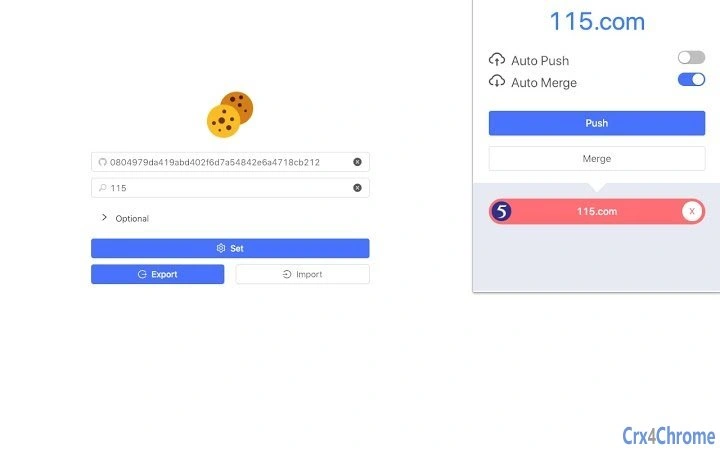
The user interface is designed with simplicity in mind, focusing on core functionality without unnecessary visual elements. Navigation is straightforward, with a central panel for initiating sync operations and managing connected devices. Users can add devices via a unique identifier or QR code, depending on the implementation detailed in the documentation.
Workflow efficiency is enhanced by the minimal number of steps required to start a sync session. The application does not require administrative privileges for basic operation, which improves accessibility across different user accounts. The developer did not specify resource usage details, so general performance behavior is based on typical desktop utility patterns. The application runs in the background during syncs and does not appear to consume significant CPU or RAM when idle.
Stability is expected to be consistent with open-source desktop tools of similar scope. No reported crashes or memory leaks were mentioned in the public repository. The software does not include real-time sync monitoring or progress tracking, so users must rely on completion notifications. Performance may vary depending on network speed and the number of cookies being transferred.
Compatibility & System Requirements
The software is compatible with Windows, Mac, and Linux operating systems, as stated in the product information. The version number is 1.0.0, indicating a stable initial release. The installation size is 10.2 MB, which is relatively compact for a desktop application with cross-device functionality.
Exact system requirements were not listed. This includes details about minimum processor speed, RAM, or disk space. The developer did not specify whether the application requires specific browser versions or additional runtime environments. Platform compatibility information is limited to the operating systems supported, with no mention of specific versions (e.g., Windows 10 or later).
Given the application’s lightweight size and desktop nature, it is likely to run on most modern systems. However, users should verify compatibility with their specific setup. The software does not appear to depend on external services for core functionality, reducing dependency on network availability during operation.
Pros and Cons
Pros
- Free to use with no hidden costs or subscription models
- Open-source, allowing transparency and community contributions
- Operates locally, minimizing privacy risks from cloud storage
- Supports multiple operating systems, increasing accessibility
- Lightweight installation at only 10.2 MB
Cons
- No official documentation beyond the GitHub README
- Unclear if the software supports automatic or scheduled syncs
- Missing advanced features like conflict resolution or version control
- Performance and resource usage details were not provided
- No built-in user support or help center
FAQ Section
Is Sync My Cookie available for all major operating systems?
Yes, the software supports Windows, Mac, and Linux, making it accessible to users across different platforms.
Is the software secure to use?
The application operates locally and does not upload data to external servers. This design enhances security and privacy, though users should still ensure their devices are protected with up-to-date antivirus software.
How often can I sync my cookies?
The frequency of syncs depends on user-initiated actions. The software does not include automated or scheduled sync features, so each sync must be triggered manually.
Can I use this tool without an internet connection?
While the application does not require a constant internet connection to run, syncing cookies between devices requires a network connection between the machines involved.
Is there a license associated with this software?
As an open-source tool, it is distributed under a license available in the GitHub repository. Users are encouraged to review the license file for full terms of use.
Final Thoughts + CTA
Sync My Cookie presents a focused, privacy-first solution for users who need to maintain consistent browser sessions across multiple devices. Its open-source nature, local operation, and multi-platform support make it a compelling choice for developers and privacy-conscious individuals. While it lacks advanced features and detailed documentation, its core functionality is well-executed and reliable for its intended purpose.
For those seeking a lightweight, free tool to sync cookies without relying on cloud services, this software delivers a practical and secure alternative. The absence of monetization and the commitment to transparency strengthen its credibility. Despite some limitations in usability and feature depth, the tool fills a specific gap in the desktop utility market.
Download Sync My Cookie now







